

Wave Planning
Wave Planning groups your treated applications into sequenced migration waves. It integrates application sizing and the Cloud Accelerate Factory so each wave reflects real effort, dependencies and delivery resourcing. Complete 6R treatments first so the planner has accurate inputs.
The left sub-nav has three areas: Wave Plan, App Complexity and Wave Settings.
Why it matters: grouping applications into waves controls risk, balances resource constraints and manages dependencies. Smaller waves reduce downtime and let teams apply lessons learned to later waves.
Wave Plan
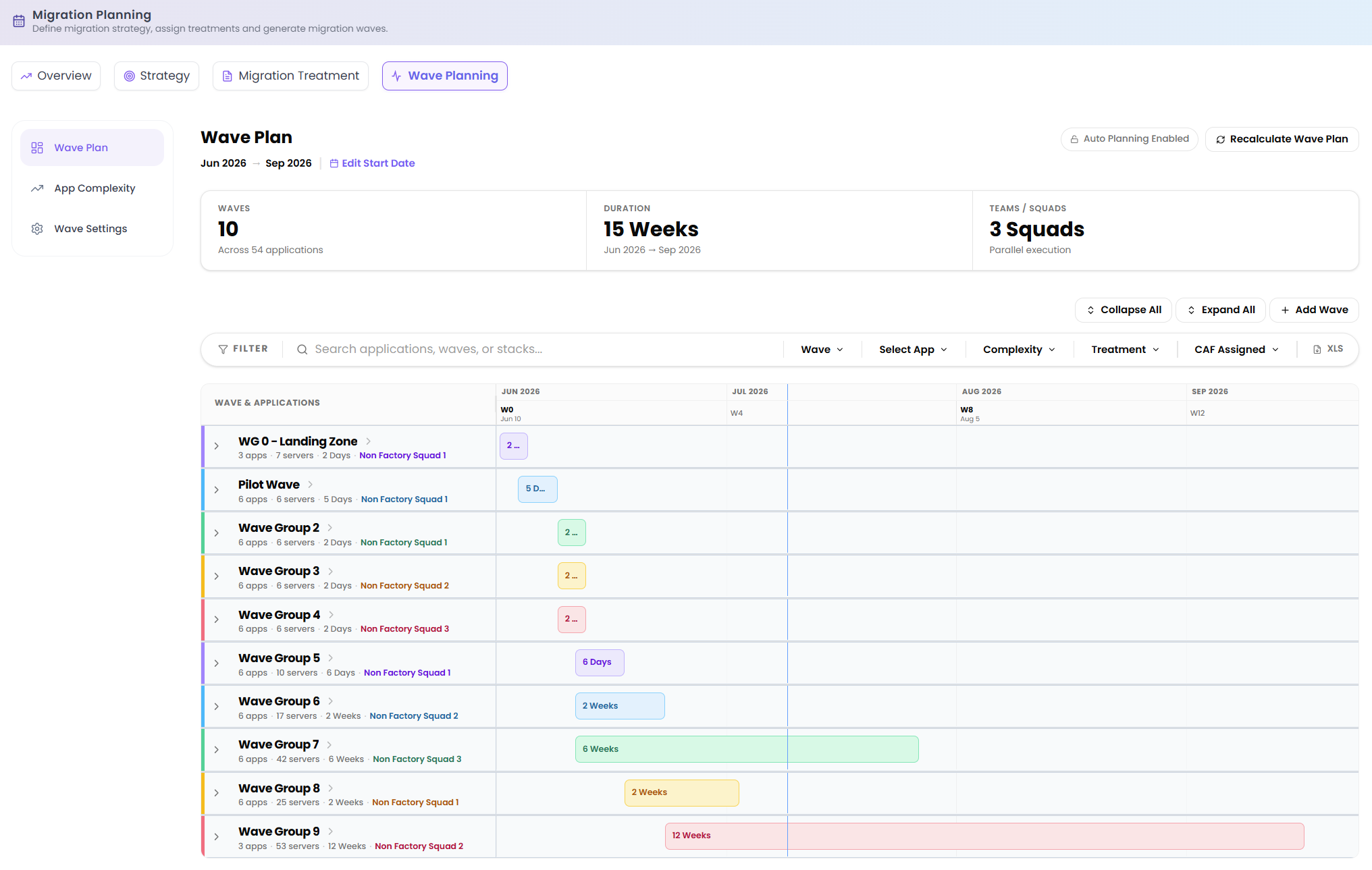
The Wave Plan is the working view of the schedule. Set the overall window with Edit Start Date, and read the headline metrics from the tiles (counts illustrative):
| Tile | What it shows |
|---|---|
| Waves | Number of waves, across N applications. |
| Duration | Total planned duration, in weeks. |
| Teams / Squads | Number of parallel migration teams working the plan. |
Two toggles control how the plan behaves: Auto Planning Enabled lets Dr Migrate group and sequence waves automatically, and Recalculate Wave Plan re-runs the planner against the latest data and settings.
The plan itself is a Gantt-style view of waves and their applications. Use Collapse All / Expand All to control detail, and Add Wave to create a new wave. Narrow the view with the filters: Wave, Select App, Complexity, Treatment and CAF Assigned. You can export the plan to XLS.
Move applications between waves by dragging them; any application you remove drops into Unassigned until you place it. Where a wave is CAF-assigned, the plan can surface the savings Microsoft covers, because the Cloud Accelerate Factory provides the resourcing for those workloads.
App Complexity
Application Sizing & Complexity Analysis classifies each application into a sizing band, which feeds the effort and duration of every wave. The AI evaluates workload scale, integrations, environments and migration-coordination signals to place each app in one of five bands:
| Band | Indicative effort |
|---|---|
| Low | Smallest, simplest applications. |
| Medium | Moderate scale and integration. |
| High | Larger footprint or more dependencies. |
| Very High | Substantial scale and coordination needs. |
| Unrated | Applications or servers not yet classified, typically those not yet associated with an application workload. This is a catch-all category rather than a complexity tier. |
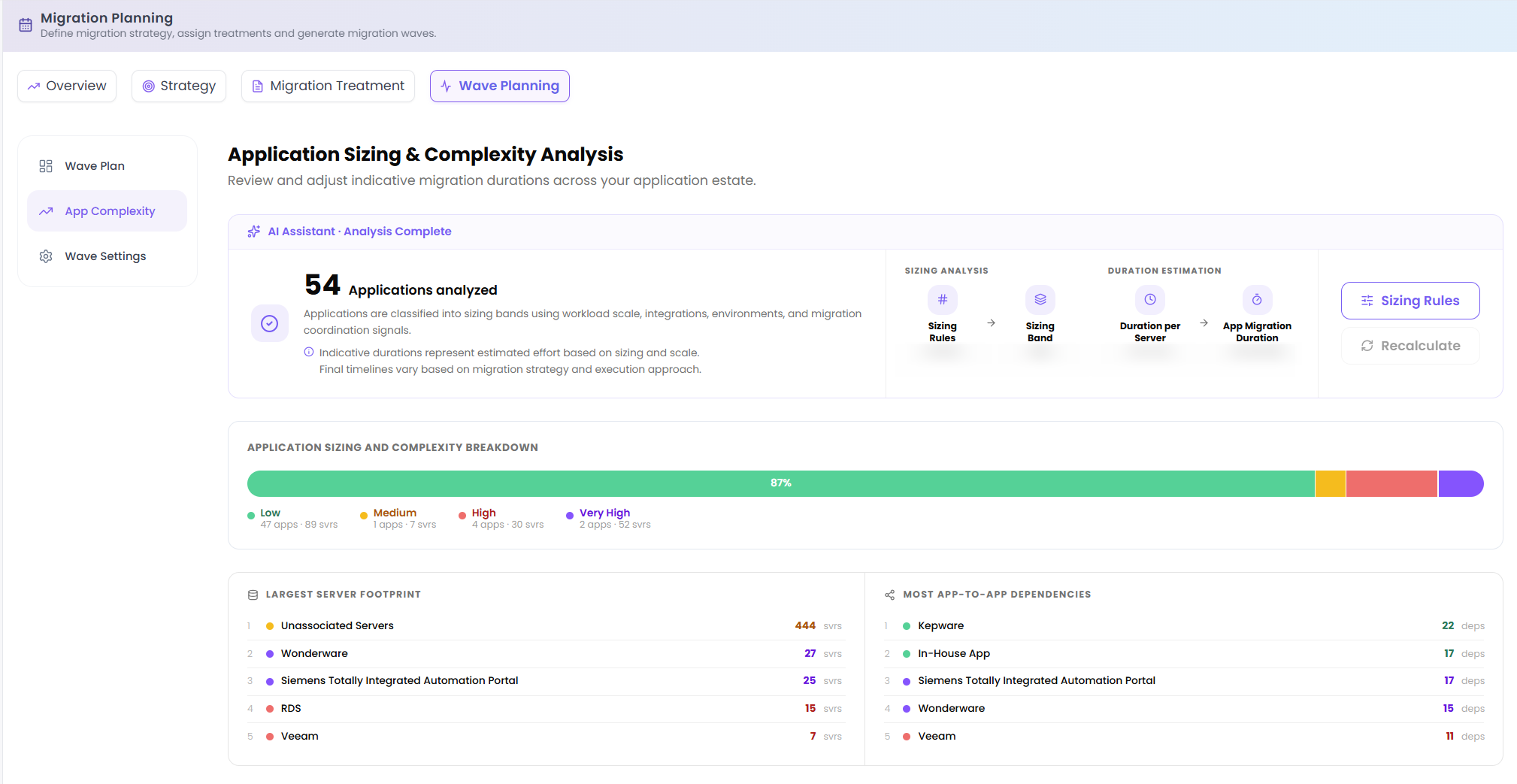
The screen also shows the inputs and outputs behind the bands:
- Sizing Rules: the thresholds that define each band.
- Duration Estimation: how a band translates into estimated migration effort and duration.
- Largest Server Footprint: the applications with the heaviest infrastructure.
- Most App-to-App Dependencies: the most interconnected applications.
- Applications by Sizing Band: the spread of the estate across the five bands.
App Complexity replaces the old standalone Application Sizing page; sizing now lives directly inside Wave Planning, where it drives wave effort and duration.
Wave Settings
Wave Settings controls how the planner builds and sequences waves, including sizing limits, planning preferences, duration factors and grouping weights. All Wave Plan settings are explained directly within the Dr Migrate tool. Open Wave Settings in-app to see the available options and adjust them to fit your delivery capacity.
When you've adjusted settings, use Save settings to store them, or Save & Recalculate to apply them and rebuild the wave plan in one step.
Best practice: start with automatic planning to set a baseline, review the timeline and metrics against your business windows and resource constraints, adjust size limits and team counts incrementally with a recalculate after each change, then share the schedule with stakeholders and revisit as new data emerges.
Cloud Accelerate Factory (CAF)
The Cloud Accelerate Factory (previously the Microsoft Migration Factory, now integrated directly into wave planning) is a Microsoft programme that covers the resourcing for qualifying migrations. Dr Migrate auto-identifies candidate applications that meet Microsoft's criteria and folds them into the plan.
Candidate applications move through a series of states:
- Auto-identified: Dr Migrate flags applications that meet the CAF criteria.
- Nominated: you or the customer put applications forward for consideration.
- CAF-aligned: confirmed for factory delivery.
CAF-aligned applications flow straight into wave planning, and their waves can show the savings Microsoft covers because the factory provides the migration resourcing. Filter the Wave Plan by CAF Assigned to see them in context.
On the roadmap: targeted CAF sessions (guided, scoped engagements to move CAF-aligned waves through the factory) are planned for a future release.