

Get Started
Getting started with Dr Migrate involves two decisions and a licence request.
Click each step below to compare your options, then select your path to get started.
Choose Your Hosting Method
Dr Migrate can be hosted in two ways. Use the comparison below to determine which option best suits your organisation's requirements for control, data residency, and setup complexity.
| SaaS (Cloud) | Marketplace | |
|---|---|---|
| Time to get started | Altra provisions your instance. No infrastructure setup on your side. | Requires deployment and configuration within your own Azure environment |
| Managed & maintained by Altra | Fully managed and maintained by the Altra team | Customer is responsible for infrastructure management |
| Azure subscription required | No Azure subscription needed | Requires an active Azure subscription |
| Data residency | Dedicated instance in an Azure region matched to your geography | Entirely within your own Azure tenant |
| Data isolation | Dedicated resource group per customer, no shared infrastructure | Your tenant, your controls |
| Strict data sovereignty requirements | Data resides in Altra's secure environment, not your tenant | Data never leaves your Azure tenant |
| ISO 27001 & GDPR compliant | Altra's certified environment | Dependent on your organisation's own controls and certifications |
Want to see how each hosting model is structured under the hood? See Architecture & Hosting.
Next Steps
Altra provisions and manages your Dr Migrate instance in a dedicated Azure region matched to your geography. No infrastructure setup required on your side.
Deploy Dr Migrate directly into your own Azure tenant via the Azure Marketplace. Full control over your infrastructure and data residency within your environment.
Choose Your Data Collection Method
Dr Migrate supports two data collection methods, and both are fully supported, production-grade options. Both work with either hosting option. Choose the one that fits your environment.
- Your servers aren't easily reachable from Azure
- You need SQL Server or dependency-mapping detail
- Your estate spans Nutanix, Physical, or AWS EC2
- You want discovery to run fully on-premises with no Azure dependency
Features
- VMware, Hyper-V, Nutanix, Physical, AWS EC2, Windows, Linux, SQL Server
- Full SQL instance and database discovery
- Dependency mapping and port scanning
- No Azure subscription required
- Runs entirely on-premises, outbound only
- You already have Azure Migrate appliances or projects running
- Your estate is primarily VMware, Hyper-V, or Physical
- You want discovery data to stay inside your existing Azure Migrate project
Features
- VMware, Hyper-V, Physical
- Infrastructure metrics and performance data
- Infrastructure-level SQL host detection
- Reuses existing Azure Migrate appliances and projects
- Requires Azure connectivity, outbound only
See it in context
Here's how each method actually moves data, based on the hosting model you chose in step 1:
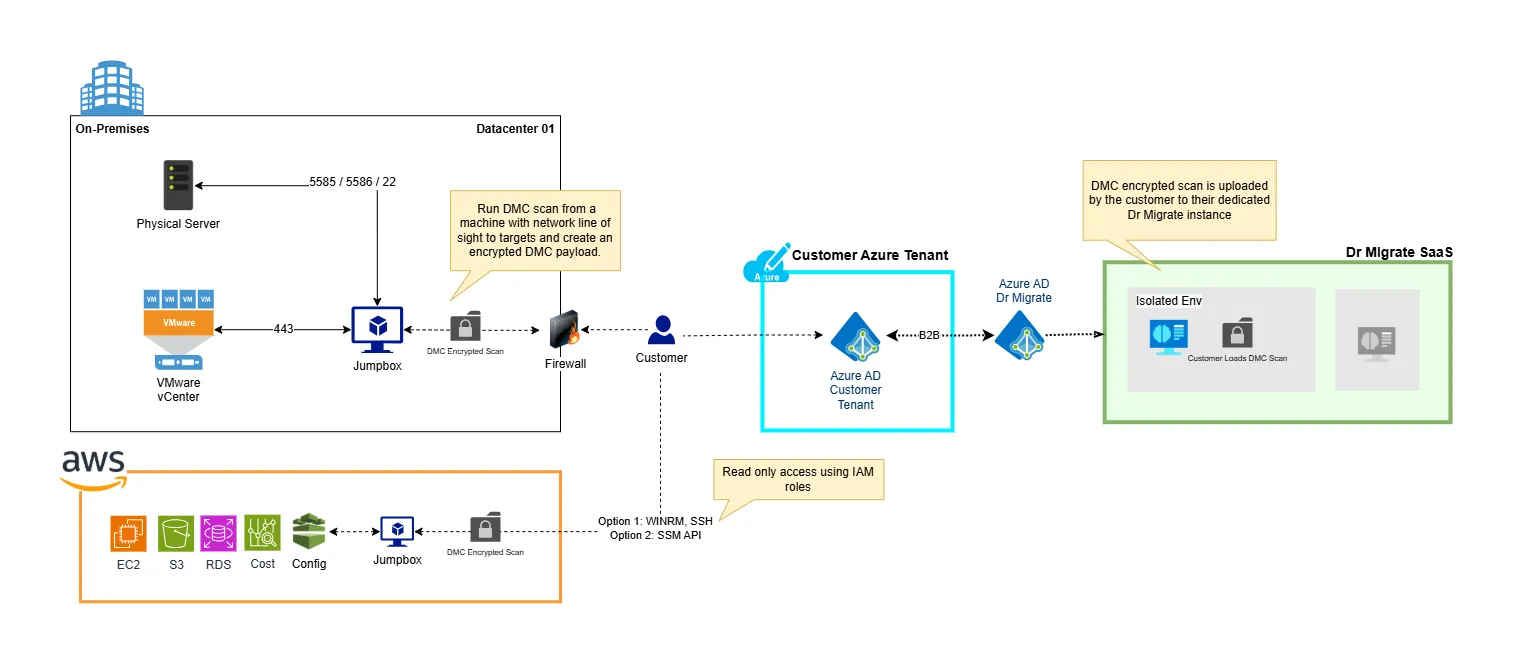
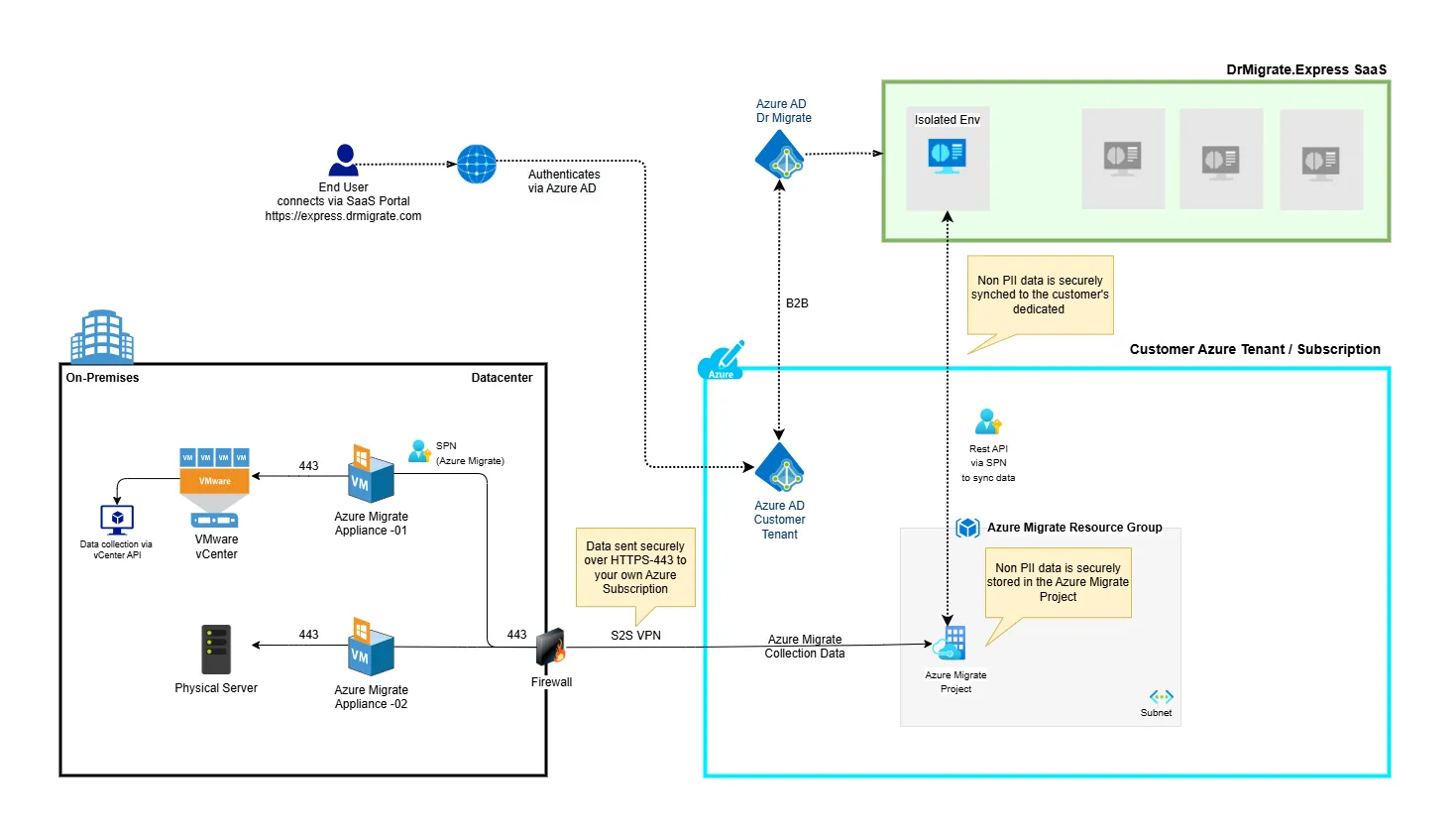
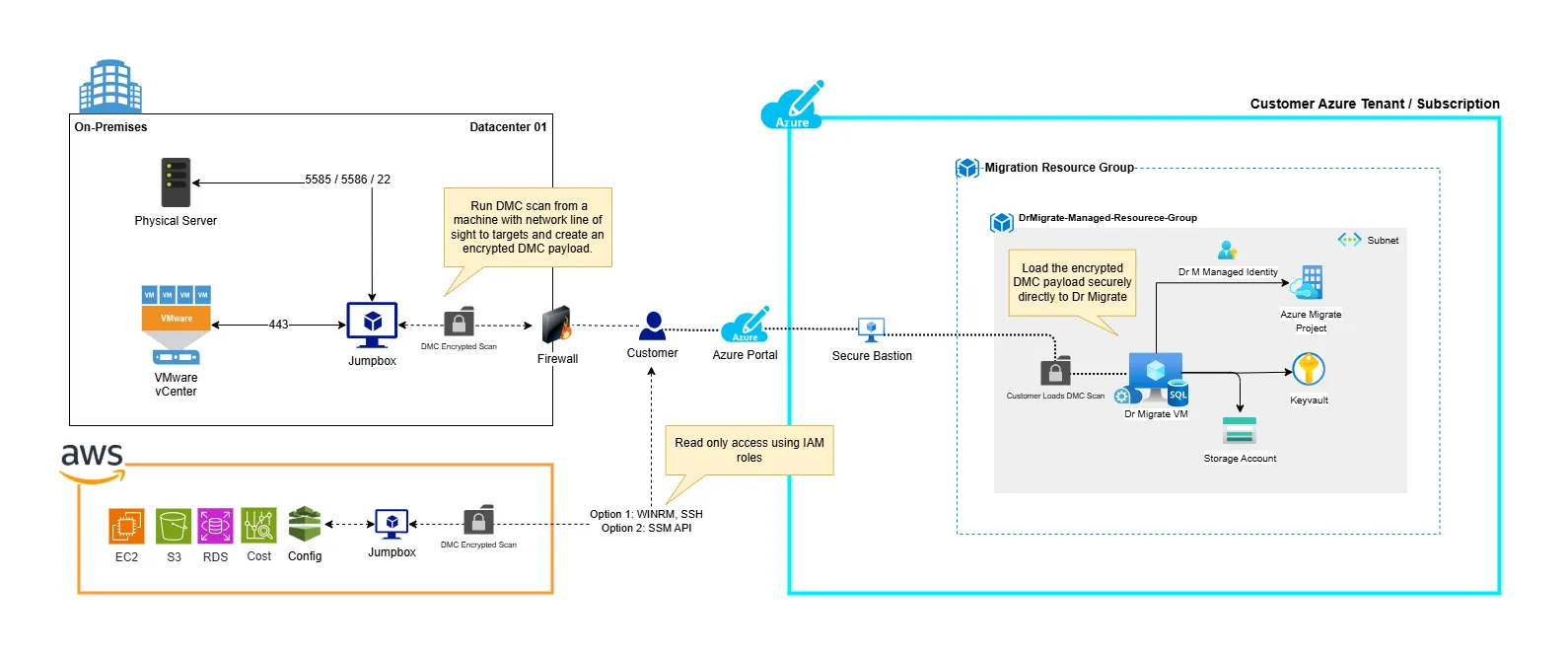
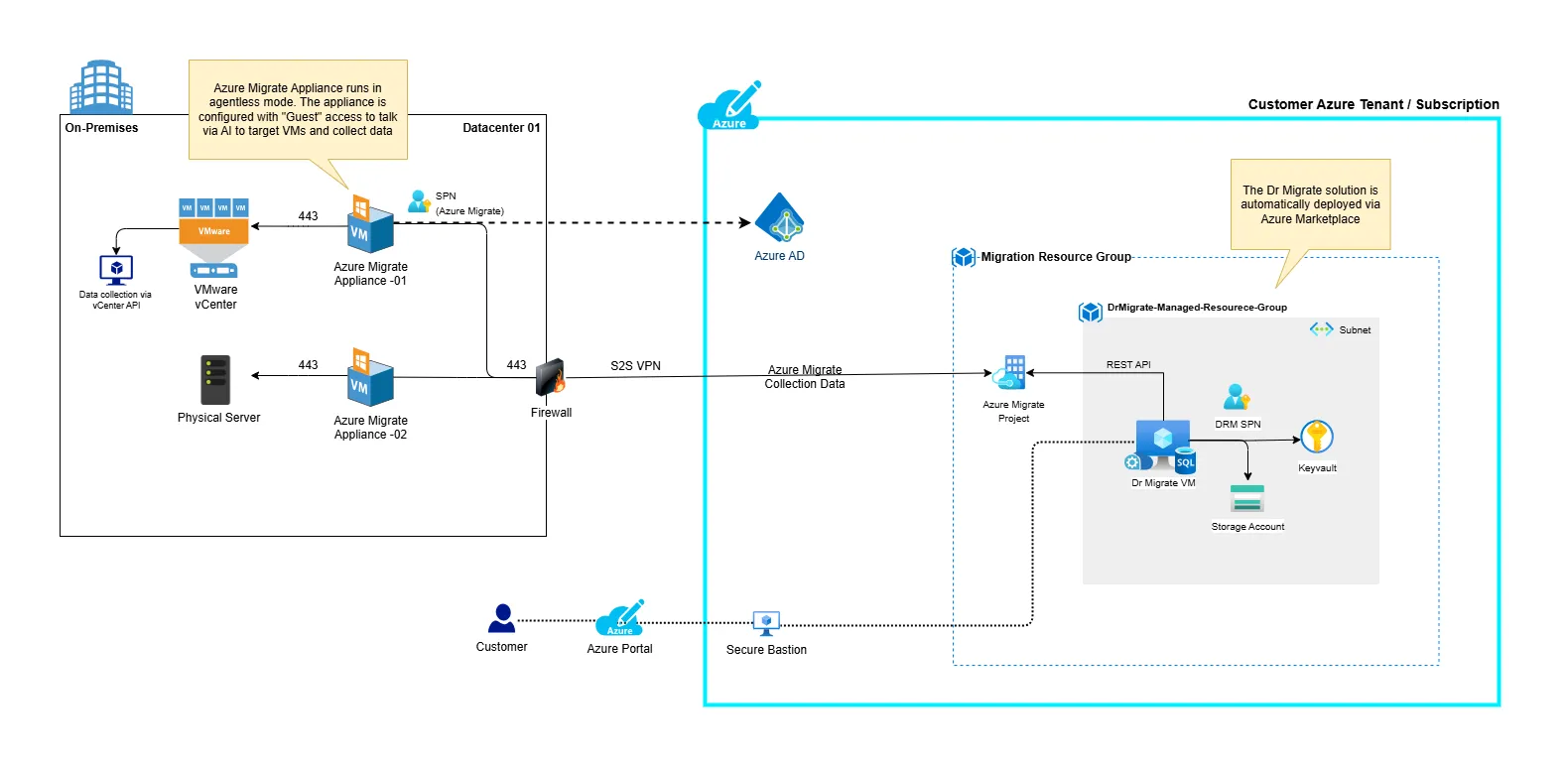
For deeper detail on managed resource group contents, identity/authentication flows, and VM sizing, see Architecture & Hosting.
Technical comparison
| DMC (Dr Migrate Collector) | Azure Migrate | |
|---|---|---|
| Best for | Mixed-platform, locked-down, or non-Azure environments | Azure-native environments already using Azure Migrate |
| Azure subscription | Not required | Required for appliance and project setup |
| Supported platforms | VMware, Hyper-V, Nutanix, Physical, AWS EC2, Windows, Linux, SQL Server | VMware, Hyper-V, Physical |
| SQL Server discovery | Full instance and database discovery | Infrastructure-level SQL host detection |
| Application and network insight | Dependency mapping and port scanning included | Infrastructure metrics and performance data |
| Network connectivity | Runs entirely on-premises, outbound only | Requires Azure connectivity, outbound only |
| Existing Azure Migrate investment | Uses its own dedicated collector | Reuses your existing appliances and projects |
| Where discovery data lives | Uploaded to your Dr Migrate instance | Held in your Azure Migrate project, read by Dr Migrate via REST API |
Get Started
Agentless, lightweight collector that scans VMware, Hyper-V, Nutanix, Physical, Windows, Linux, and SQL environments directly. No Azure subscription required.
Microsoft's unified discovery and assessment platform. Ideal if you already have Azure Migrate appliances in place or want discovery data to stay within your Azure environment.
Request a Licence
All installations begin with a licence request. The process differs slightly depending on your hosting method. Use the comparison below, then follow the link for your deployment type.
| SaaS (Cloud) | Marketplace | |
|---|---|---|
| What the licence enables | Access to your Altra-hosted Dr Migrate instance, provisioned by the Altra team | Permission to deploy Dr Migrate into your own Azure tenant via the Marketplace |
| Who can request | Altra & Microsoft Partners, Microsoft, End Clients | Altra & Microsoft Partners, Microsoft, End Clients |
| First 90 days | Free (Microsoft-funded trial period) | Free (Microsoft-funded trial period) |
| After approval | Altra provisions your instance, or you can self-serve activate and set up billing directly via the Azure Marketplace | You configure your Azure environment and deploy Dr Migrate via the Marketplace |
Request Your Licence
Most customers now activate and set up billing for their SaaS licence directly through the Azure Marketplace - no need to wait on Altra provisioning. See SaaS Plan Setup to do it yourself.